

OPSCENTER visual merch reviews: retail visual merchandising software
for multi-location store
VISUAL MERCH REVIEWS
OPSCENTER Task Manager gives multi-location retailers one platform to create, assign, track, and complete tasks across every store — with real-time reporting and full visibility into execution at every level of the organization.













Visual Merchandising Compliance Breaks Down Without a Structured Review System
When store teams submit display photos through text messages, email attachments, or separate file sharing apps, auditing becomes a manual nightmare. District managers spend hours downloading images, cross-referencing them with reference photos from a different source, and following up on discrepancies with no record of the conversation.
HQ has no scalable way to verify that promotions, seasonal displays, or planogram layouts are being executed correctly across dozens or hundreds of locations. Compliance is assumed, not confirmed.
Multi-location retailers need a visual merchandising review process that is structured, auditable, and centralized in the same platform their store teams already use for daily operations.
What OPSCENTER Visual Merch Reviews Does for Your Store Network
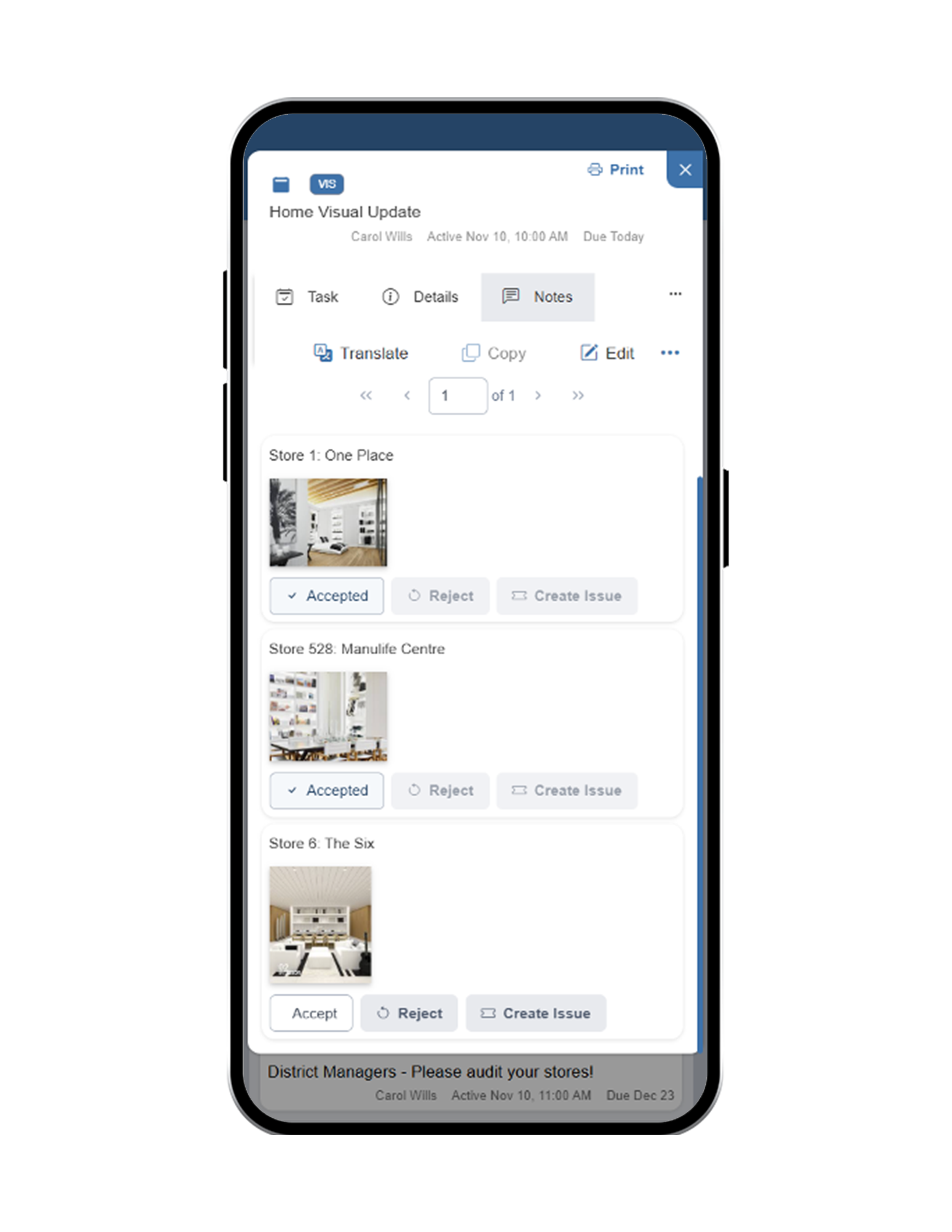
OPSCENTER Visual Merch Reviews is a retail visual merchandising audit platform that guides store associates through display execution step by step, collects photo submissions directly in the platform, and gives district managers and HQ reviewers the tools to audit results against reference images, provide feedback, and download submissions in bulk.
Guided Task-Based Display Execution
Create tasks that walk store associates through each step of a merchandising display with clear instructions and photo submission requirements built in at every stage.
Learn More →In-Platform Photo Submission
Associates photograph completed displays and submit them directly through OPSCENTER. No third-party apps, no email attachments, no lost images buried in a thread.
Learn More →Side-by-Side Reference Image Comparison
Auditors compare the original reference image to the store submission directly within the platform. Discrepancies are visible immediately, without switching between tools or downloads.
Learn More →Feedback and Discrepancy Flagging
Reviewers provide feedback on submissions directly in the platform. Associates and managers see the feedback in context, tied to the specific display or step that requires correction.
Learn More →Bulk Photo Download for Audits and External Review
All submitted photos can be downloaded in bulk for future audits, brand compliance reviews, or external reporting. No manual file collection across multiple submissions.
Learn More →Multi-Level Review Permissions
District managers, regional leads, and HQ reviewers each access the level of visibility appropriate to their role — from a single store audit to a full organization compliance view.
Learn More →Create the Merchandising Review Task
Build a guided task that walks store associates through each display step, with photo submission requirements defined at each stage and reference images attached for comparison.
Stores Execute and Submit Photos
Associates complete the display following the guided task, photographing each stage and submitting images directly through OPSCENTER at the point of completion.
Auditors Review Against Reference Images
District managers and HQ reviewers open submissions and compare them side by side with the original reference images — all within the platform, with no external tools required.
Provide Feedback, Flag Issues, and Download Results
Reviewers leave feedback directly on submissions, flag discrepancies for follow-up, and download all photos in bulk for archive, compliance, or external brand review purposes.
How Retail Visual Merchandising Audit Software Works Across Your Store Network
Built for Every Role Managing Visual Merchandising Compliance
HQ & Operations Teams
Create standardized visual merchandising review tasks distributed across every store location
Access a full compliance view of display execution across the organization with submitted photos and audit results
Download all store submissions in bulk for brand audits, external review, or compliance reporting
District & Store Manager
Audit store display submissions against reference images without leaving the platform
Flag discrepancies and provide actionable feedback tied directly to the submission in question
Monitor execution status across multiple store locations without manual photo collection or follow-up
Store Associates
Follow guided, step-by-step display tasks with reference images available at each stage
Submit display photos directly in OPSCENTER without using a separate app or communication channel
Receive feedback on submissions in the same platform where the task was assigned
Visual Merch Reviews Works With Every Tool in OPSCENTER
Visual Merch Reviews connects directly with Task Manager so every merchandising review is a tracked, assignable task with deadlines and completion requirements. Link to Planograms so associates reference the correct layout while completing the display submission. Use Dashboards to monitor visual merchandising compliance rates across your full store network in real time.
Get to know OPSCENTER | Visual Merch Reviews
What Retail Visual Merchandising Teams See With OPSCENTER
Frequently Asked Questions About Visual Merchandising Software
Retail visual merchandising software gives multi-location retailers a structured platform to guide store teams through display execution, collect photo proof of completion, and audit results against reference images at scale.
OPSCENTER Visual Merch Reviews centralizes this entire process in one platform connected to your daily store operations tools.
Associates complete their guided merchandising task in OPSCENTER and photograph each stage directly through the platform.
Photos are submitted in context, tied to the specific task step they belong to, so auditors can review them with full context without any additional file management.
Yes. OPSCENTER Visual Merch Reviews gives district managers and HQ reviewers a side-by-side view of the original reference image and the store submission within the platform.
Discrepancies are visible immediately and feedback can be provided in the same view.
Yes. All photos submitted through Visual Merch Reviews can be downloaded in bulk at any time.
This makes it straightforward to run full-organization audits, prepare compliance reports, or share results with external brand or operations teams without manual file collection.
Give Your Retail Merchandising Audits Structure, Visibility, and Scale With OPSCENTER
OPSCENTER Visual Merch Reviews replaces scattered photo submissions and manual audit processes with a centralized, guided, and fully auditable visual merchandising review system built for multi-location retail.