

Retail planogram software for multi-location visual merchandising execution
RETAIL PLANOGRAM SOFTWARE
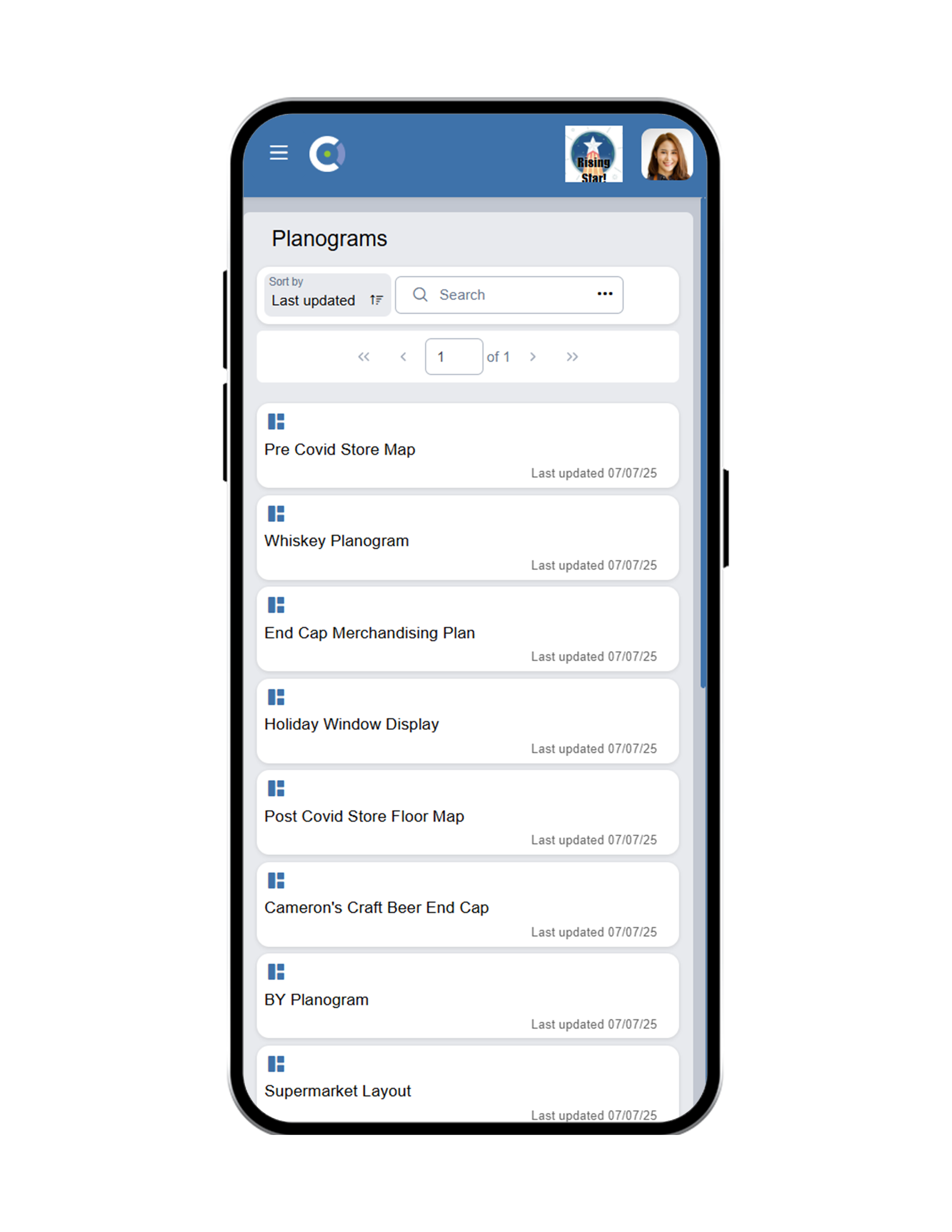
OPSCENTER Planograms gives multi-location retailers interactive, on-screen merchandising maps that guide store teams through floor layouts and communication boards — with direct document links, third-party integration, and real-time issue resolution built into every planogram.













Planogram Execution Breaks Down When Stores Lack Clear, Accessible Guidance
When store teams receive planograms as static PDF attachments buried in an email chain, execution suffers. Associates cannot find the right version, cannot access supporting documents quickly, and have no way to flag issues without picking up the phone or waiting for a manager to respond.
District leaders end up fielding the same questions from multiple locations, losing hours to clarification calls that should not need to happen. HQ has no visibility into whether the planogram was followed or what issues came up during execution.
Multi-location retailers need planogram distribution that is visual, interactive, and connected to the tools their store teams already use every day.
What OPSCENTER Planogram Software Does for Your Store Network
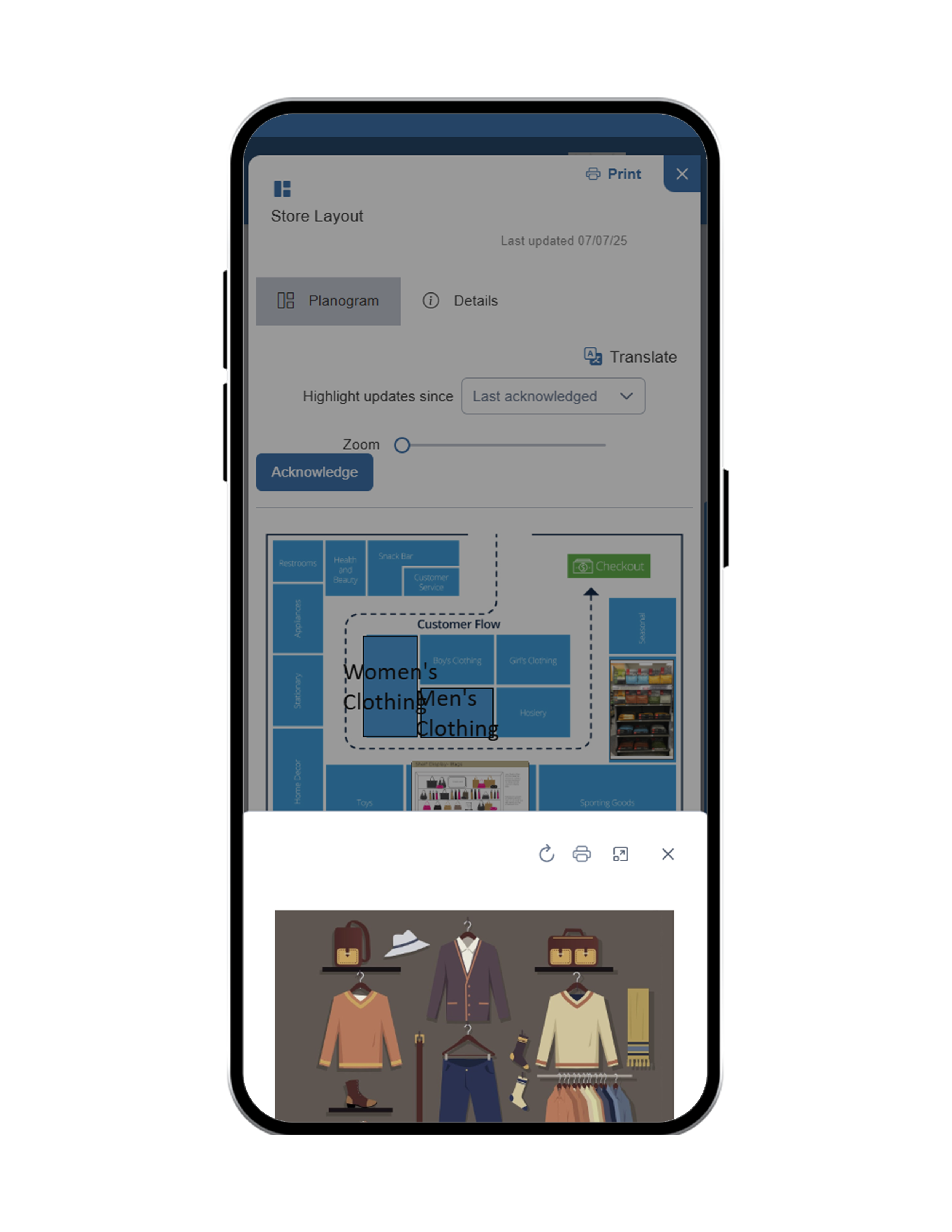
OPSCENTER Planograms is a retail planogram management platform that lets you create interactive, on-screen maps of communication boards and floor layouts — with clickable areas that link directly to the documents, images, and instructions store teams need to execute correctly. Build planograms inside the platform or connect with your existing third-party planogram software.
Interactive Floor and Board Maps
Create clickable, on-screen maps of your floor layouts and communication boards. Each zone or display area links directly to the relevant documents so associates always have what they need, in context, at the right moment.
Learn More →Direct Document and Asset Linking
Attach product sheets, setup guides, promotional assets, or compliance references directly to specific areas of the planogram. No searching through shared drives or email threads.
Learn More →Third-Party Planogram Software Integration
Already using a dedicated planogram platform? OPSCENTER integrates with third-party planogram software so store teams access all their merchandising guidance from one place without switching systems.
Learn More →Built-In Issue Resolution via Tickets
When associates encounter a problem during planogram execution, the Tickets module lets them flag the issue directly within the platform. District managers and HQ respond in the same system, closing the loop without external communication channels.
Learn More →Version Control and Distribution at Scale
Distribute updated planograms to any combination of stores, districts, or the full organization. Every team always sees the current version with no risk of outdated layouts being followed in the field.
Learn More →Execution Guidance at the Associate Level
Planograms in OPSCENTER are built to be used by the associate completing the display, not just the manager overseeing it. Clear, visual, clickable guidance reduces execution errors and speeds up setup time on the floor.
Learn More →How Retail Planogram Software Works Across Your Store Locations
Build or Import Your Planogram
Create interactive floor or board maps directly inside OPSCENTER, or import layouts from your existing third-party planogram platform into one connected system.
Link Documents and Assets to Each Zone
Attach the relevant product guides, promotional materials, and setup instructions to specific areas of the map so associates find everything they need without leaving the planogram view.
Distribute to Stores, Districts, or the Full Organization
Push planograms to any target group with version control ensuring every location receives and works from the current layout, not an outdated one.
Resolve Issues and Track Execution
Associates flag problems directly through the Tickets module. Managers respond in real time. Execution gaps are identified and closed before they affect in-store performance.
Built for Every Role Managing In-Store Merchandising Execution
HQ & Operations Teams
Build and distribute interactive planograms across every store location from one platform
Control version distribution so every store always works from the correct, current layout
Integrate with existing third-party planogram tools to centralize merchandising guidance
District & Store Manager
Monitor planogram execution across multiple store locations without manual follow-ups
Resolve associate issues quickly through the built-in Tickets module without leaving the platform
Ensure promotional and seasonal layouts are followed consistently across every location
Store Associates
Access interactive floor maps and communication board layouts with all supporting documents linked directly
Flag execution issues instantly through the platform without waiting for a manager callback
Complete merchandising setups faster with clear, visual, clickable guidance at the display level
Planograms Works With Every Tool in OPSCENTER
Planograms connect directly with Task Manager so planogram execution can be assigned as a tracked task with deadlines and completion requirements. Link to Visual Merch Reviews so associates submit photos of completed displays for manager review and audit. Use Dashboards to track planogram compliance across your full store network in real time.
Get to know OPSCENTER | Planograms
What Retail Merchandising Teams See With OPSCENTER Planograms
Frequently Asked Questions About Retail Planogram Software
Retail planogram software gives multi-location retailers a platform to create, distribute, and manage floor layout and merchandising display maps across every store.
OPSCENTER Planograms goes further by making those maps interactive with direct document links and built-in issue resolution tools for store teams.
Yes. OPSCENTER integrates with third-party planogram software so retailers who already use a dedicated planogram platform can bring that content into OPSCENTER.
Store teams access all their merchandising guidance from one place without switching between systems.
Associates open the interactive map for their store layout or communication board and tap or click any zone to access the linked documents, images, or setup guides for that area.
If an issue comes up during execution, they flag it directly through the Tickets module for fast resolution.
When HQ updates a planogram and distributes it, every targeted store receives the new version through the platform.
There is no risk of teams working from an outdated layout because every location always sees and accesses the current, approved version.
GET STARTED
Give Every Store Clear, Interactive Merchandising Guidance With OPSCENTER Planograms
OPSCENTER Planograms replaces static files and email attachments with interactive, linked, always-current layouts that store teams can actually use — and managers can actually track.